Demo 2:|±⟩ 测量概率
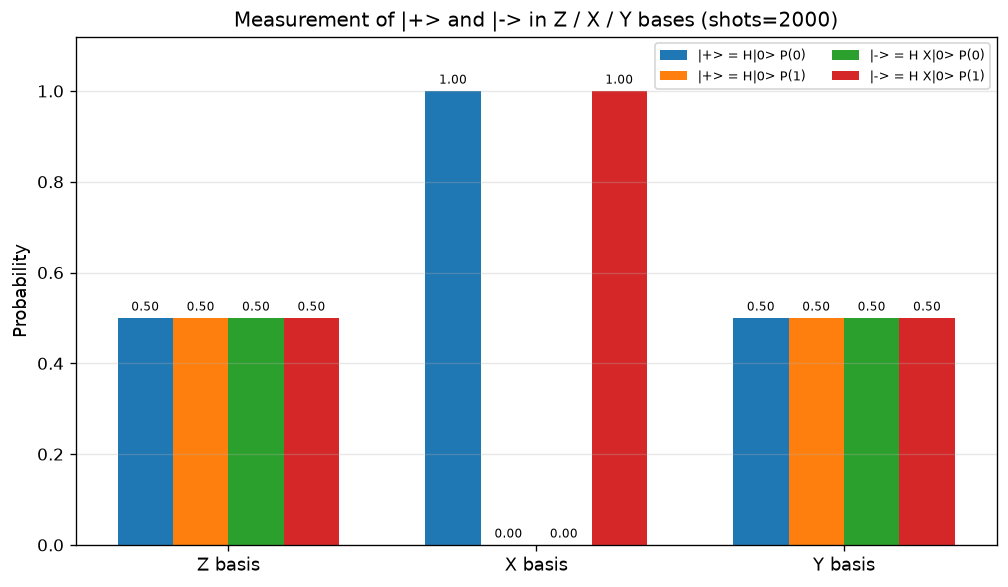
可视化:4 根/基 柱状 —— 在 X/Y/Z 基上 P(0)/P(1) 分组柱图
对应教程:第 1 章 量子计算基础 中相关小节 · 依赖安装:pip install "unified-quantum[visualization,simulation]"
实现要点
为每个态跑 3 个电路(X/Y/Z 基测量),用柱状图对比 P(0)/P(1)。
完整源码
demos/ch01-basics/02_measurement_probability.py
 1"""
 2ch01-basics demo 2:|+> 与 |-> 在 X / Y / Z 三基上的测量概率
 3
 4对应教程:chenzhaoyun.com/quantum-tutorial/chch01-basics/02-measurement-probability.html
 5依赖:pip install unified-quantum[visualization]
 6运行:python demos/ch01-basics/02_measurement_probability.py
 7
 8为每个态跑 3 个电路(X/Y/Z 基测量),用柱状图对比 P(0)/P(1)。
 9"""
10
11from uniqc import Circuit, submit_task, wait_for_result
12import matplotlib
13matplotlib.use("Agg")
14import matplotlib.pyplot as plt
15import numpy as np
16from pathlib import Path
17
18OUT = Path(__file__).parent
19
20SHOTS = 2000
21
22
23def measure(init_gates, basis):
24    c = Circuit()
25    for g in init_gates:
26        if g == "h":
27            c.h(0)
28        elif g == "x":
29            c.x(0)
30    if basis == "X":
31        c.h(0)
32    elif basis == "Y":
33        c.sdg(0)
34        c.h(0)
35    c.measure(0)
36    tid = submit_task(circuit=c, backend="dummy:local:simulator", shots=SHOTS)
37    r = wait_for_result(tid)
38    total = sum(r.counts.values())
39    p0 = r.counts.get("0", 0) / total
40    return p0, 1.0 - p0
41
42
43# === 1. Two input states ===
44SCENARIOS = [
45    ("|+> = H|0>",   ["h"]),
46    ("|-> = H X|0>", ["x", "h"]),
47]
48BASES = ["Z", "X", "Y"]
49LABEL0 = {"Z": "P(|0>)", "X": "P(|+>)", "Y": "P(|+i>)"}
50LABEL1 = {"Z": "P(|1>)", "X": "P(|->)",  "Y": "P(|-i>)"}
51
52rows = []
53for state_name, init in SCENARIOS:
54    for basis in BASES:
55        p0, p1 = measure(init, basis)
56        rows.append((state_name, basis, p0, p1))
57        print(f"  {state_name:12s} basis={basis}: P(0)={p0:.3f}  P(1)={p1:.3f}")
58
59# === 2. Grouped bar chart: x-axis = basis, grouped bars per input state ===
60fig, ax = plt.subplots(figsize=(8.5, 5))
61x = np.arange(len(BASES))
62width = 0.18
63colors = ["#1f77b4", "#ff7f0e", "#2ca02c", "#d62728"]
64
65# Two states × two outcomes → 4 bars per basis group
66for j, (state_name, _) in enumerate(SCENARIOS):
67    for k, outcome in enumerate(["P(0)", "P(1)"]):
68        heights = [
69            next(r[2 + k] for r in rows
70                 if r[0] == state_name and r[1] == basis)
71            for basis in BASES
72        ]
73        offset = (j * 2 + k - 1.5) * width
74        bars = ax.bar(x + offset, heights, width,
75                      color=colors[j * 2 + k],
76                      label=f"{state_name} {outcome}")
77        for b, h in zip(bars, heights):
78            ax.text(b.get_x() + b.get_width() / 2, h + 0.01, f"{h:.2f}",
79                    ha="center", va="bottom", fontsize=7)
80
81ax.set_xticks(x)
82ax.set_xticklabels([f"{b} basis" for b in BASES], fontsize=11)
83ax.set_ylabel("Probability", fontsize=11)
84ax.set_ylim(0, 1.12)
85ax.set_title("Measurement of |+> and |-> in Z / X / Y bases "
86             f"(shots={SHOTS})", fontsize=12)
87ax.legend(loc="upper right", fontsize=8, ncol=2)
88ax.grid(axis="y", alpha=0.3)
89plt.tight_layout()
90plt.savefig(OUT / "02_measurement_probability.png", dpi=120, bbox_inches="tight")
91plt.close()
92
93# === 3. stdout 关键统计 ===
94print("ch01-basics-demo-2: |+> and |-> in three Pauli bases")
95print(f"  shots per circuit: {SHOTS}, total circuits: {len(rows)}")
96print(f"  ideal: |+> → Z=(0.5,0.5) X=(1,0) Y=(0.5,0.5);  "
97      f"|-> → Z=(0.5,0.5) X=(0,1) Y=(0.5,0.5)")
运行结果
运行方式
# 仓库根目录执行;输出 PNG 到 demos/ch01-basics/02_measurement_probability.png,关键统计到 stdout
.venv/bin/python3 demos/ch01-basics/02_measurement_probability.py