Demo 1:Bloch 球轨迹
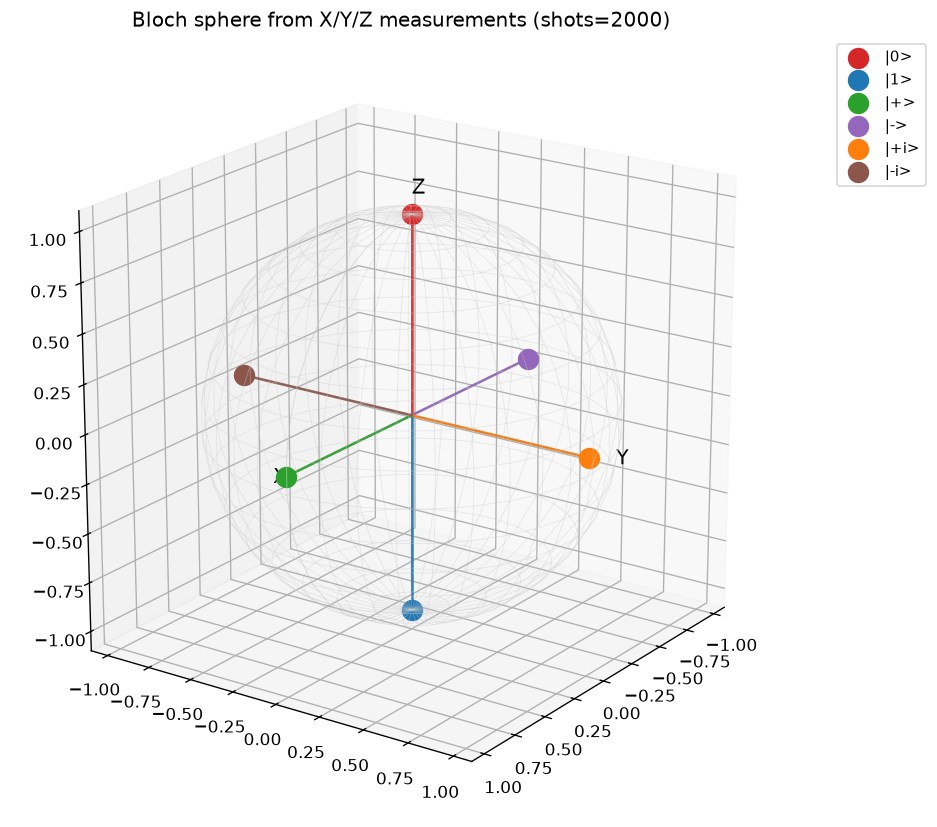
可视化:球面 6 个箭头 —— 6 个基准态的 ⟨X⟩,⟨Y⟩,⟨Z⟩ 测得 Bloch 矢量画在单位球上
对应教程:第 1 章 量子计算基础 中相关小节 · 依赖安装:pip install "unified-quantum[visualization,simulation]"
实现要点
对 |0⟩、|1⟩、|+⟩、|-⟩、|+i⟩、|-i⟩ 六个基态分别在 X/Y/Z 基上做 2000 次测量, 反推出 Bloch 矢量 (⟨X⟩, ⟨Y⟩, ⟨Z⟩),在单位球面上画散点。
完整源码
demos/ch01-basics/01_bloch_sphere.py
  1"""
  2ch01-basics demo 1:Bloch 球上六个基本态
  3
  4对应教程:chenzhaoyun.com/quantum-tutorial/chch01-basics/01-bloch-sphere.html
  5依赖:pip install unified-quantum[visualization]
  6运行:python demos/ch01-basics/01_bloch_sphere.py
  7
  8对 |0⟩、|1⟩、|+⟩、|-⟩、|+i⟩、|-i⟩ 六个基态分别在 X/Y/Z 基上做 2000 次测量,
  9反推出 Bloch 矢量 (⟨X⟩, ⟨Y⟩, ⟨Z⟩),在单位球面上画散点。
 10"""
 11
 12from uniqc import Circuit, submit_task, wait_for_result
 13import matplotlib
 14matplotlib.use("Agg")
 15import matplotlib.pyplot as plt
 16from mpl_toolkits.mplot3d import Axes3D  # noqa: F401  registers 3D projection
 17import numpy as np
 18from pathlib import Path
 19
 20OUT = Path(__file__).parent
 21
 22
 23def measure_basis(prep_gates, basis, shots=2000):
 24    """prep_gates: list of (name, qubit, [angle]) applied before measurement.
 25    Returns expectation value of the chosen Pauli."""
 26    c = Circuit()
 27    for g in prep_gates:
 28        if g[0] == "h":
 29            c.h(g[1])
 30        elif g[0] == "x":
 31            c.x(g[1])
 32        elif g[0] == "y":
 33            c.y(g[1])
 34        elif g[0] == "z":
 35            c.z(g[1])
 36        elif g[0] == "s":
 37            c.s(g[1])
 38        elif g[0] == "sdg":
 39            c.sdg(g[1])
 40    # Rotate target Pauli to Z basis before measure.
 41    if basis == "X":
 42        c.h(0)
 43    elif basis == "Y":
 44        c.sdg(0)
 45        c.h(0)
 46    c.measure(0)
 47    tid = submit_task(circuit=c, backend="dummy:local:simulator", shots=shots)
 48    r = wait_for_result(tid)
 49    total = sum(r.counts.values())
 50    p0 = r.counts.get("0", 0) / total
 51    return 2.0 * p0 - 1.0  # +1 for |0>, -1 for |1>
 52
 53
 54# === 1. Six cardinal states + their preparation sequences ===
 55STATES = [
 56    ("|0>",  []),
 57    ("|1>",  [("x", 0)]),
 58    ("|+>",  [("h", 0)]),
 59    ("|->",  [("x", 0), ("h", 0)]),
 60    ("|+i>", [("h", 0), ("s", 0)]),
 61    ("|-i>", [("h", 0), ("sdg", 0)]),
 62]
 63
 64vectors = []
 65for name, prep in STATES:
 66    ex = measure_basis(prep, "X")
 67    ey = measure_basis(prep, "Y")
 68    ez = measure_basis(prep, "Z")
 69    vectors.append((name, ex, ey, ez))
 70    print(f"  {name}: <X>={ex:+.3f}  <Y>={ey:+.3f}  <Z>={ez:+.3f}")
 71
 72# === 2. matplotlib 3D Bloch sphere ===
 73fig = plt.figure(figsize=(8, 7))
 74ax = fig.add_subplot(111, projection="3d")
 75
 76# Wireframe sphere
 77u = np.linspace(0, 2 * np.pi, 36)
 78v = np.linspace(0, np.pi, 18)
 79xs = np.outer(np.cos(u), np.sin(v))
 80ys = np.outer(np.sin(u), np.sin(v))
 81zs = np.outer(np.ones_like(u), np.cos(v))
 82ax.plot_wireframe(xs, ys, zs, color="#cccccc", linewidth=0.5, alpha=0.4)
 83
 84# Axes
 85ax.plot([-1, 1], [0, 0], [0, 0], color="#888888", lw=1)
 86ax.plot([0, 0], [-1, 1], [0, 0], color="#888888", lw=1)
 87ax.plot([0, 0], [0, 0], [-1, 1], color="#888888", lw=1)
 88ax.text(1.1, 0, 0, "X", color="black", fontsize=12)
 89ax.text(0, 1.15, 0, "Y", color="black", fontsize=12)
 90ax.text(0, 0, 1.1, "Z", color="black", fontsize=12)
 91
 92# Scatter the inferred Bloch vectors
 93colors = ["#d62728", "#1f77b4", "#2ca02c", "#9467bd", "#ff7f0e", "#8c564b"]
 94for (name, ex, ey, ez), col in zip(vectors, colors):
 95    # Normalize against theoretical (1,0,0) etc. — finite shots may yield |v| < 1
 96    vnorm = np.sqrt(ex ** 2 + ey ** 2 + ez ** 2)
 97    ax.scatter([ex], [ey], [ez], s=140, c=col, depthshade=False, label=name)
 98    ax.plot([0, ex], [0, ey], [0, ez], color=col, lw=1.6, alpha=0.8)
 99
100ax.set_xlim(-1.1, 1.1)
101ax.set_ylim(-1.1, 1.1)
102ax.set_zlim(-1.1, 1.1)
103ax.set_box_aspect((1, 1, 1))
104ax.set_title("Bloch sphere from X/Y/Z measurements (shots=2000)", fontsize=12)
105ax.legend(loc="upper left", bbox_to_anchor=(1.05, 1.0), fontsize=9)
106ax.view_init(elev=20, azim=35)
107plt.tight_layout()
108plt.savefig(OUT / "01_bloch_sphere.png", dpi=120, bbox_inches="tight")
109plt.close()
110
111# === 3. stdout 关键统计 ===
112print("ch01-basics-demo-1: Bloch sphere of six cardinal states")
113print(f"  total shots per (state, basis): 2000  ->  36 measurements overall")
114mean_purity = np.mean(
115    [np.sqrt(ex ** 2 + ey ** 2 + ez ** 2) for _, ex, ey, ez in vectors]
116)
117print(f"  mean |<v>| across the 6 states: {mean_purity:.3f}  (ideal = 1.000)")
运行结果
运行方式
# 仓库根目录执行;输出 PNG 到 demos/ch01-basics/01_bloch_sphere.png,关键统计到 stdout
.venv/bin/python3 demos/ch01-basics/01_bloch_sphere.py